By the end of this tutorial you'll have your own trump card deck on Quartettos — 32 cards, 5 or 6 comparable values per card, your own images where you want them, and the whole thing bilingual in English and German without you lifting a finger for translation. You'll be able to play it online with friends, hot-seat on one phone passed around, or solo against an AI opponent. The example we'll walk through is "Countries of the World", because everyone instantly understands what's being compared. But the same workflow handles your favorite 90s computer games, classic Amiga titles, a city's hidden pubs, or any other topic you can think of with at least 32 examples.
Why bother making your own?
The interesting card decks aren't in the toy shop. Teachers want decks that match the syllabus they're actually teaching. Hobbyists want the niche topics no publisher would ever print: WCW wrestlers, classic Amiga games, sub-genres of black metal, neighborhood pubs. The hard part has always been the research — pulling 32 facts together, balancing the numbers so one card doesn't dominate, finding images. Quartettos takes that off your hands. You bring the idea, we do the heavy lifting, you fine-tune.
One heads-up before we start: every deck we build currently lands in the public Quartettos library. Other players see it and can play it themselves. That's intentional — the variety of topics is part of the appeal — but it means you should pick a theme you're happy to share. Private inside-jokes, family content, or club-internal material isn't the right fit right now. A "private deck for me and my group" feature is on the roadmap but not yet live.
Before you start
You need three things in your head before you open the app: a theme that's specific enough to yield 32 examples, a sense of which values you'd compare (or just trust us to pick them), and an idea of your audience so the tone fits. That's it. No spreadsheets, no source list, no design skills.
A good theme is concrete and bounded. "Animals" is too broad. "African mammals" is sharp. "Famous people of all time" is too vague, because every entry would score 10/10 on fame and the game would be a coin-flip. "Roman emperors" is sharp again, with natural spread across reign length, military campaigns, and lifespan. If you're not sure, lean specific.
Values should be measurable when possible — kilograms, years, square kilometers, population counts. Subjective /10 ratings work in moderation (max two out of six), but a deck of nothing but vibes makes for tired games. You don't have to figure values out yourself, though. We'll suggest sensible categories if you leave that field blank.
Step 1: Submit your idea
Open quartettos.com and click "Sign in" at the top right. First time around you'll create an account with two fields: email address and a password of your choice. After that, the same login gets you in every visit. No profile photo, no address form, no endless checkboxes. Then find "Create your own deck" in the menu. You'll land on a pitch form with exactly three fields.
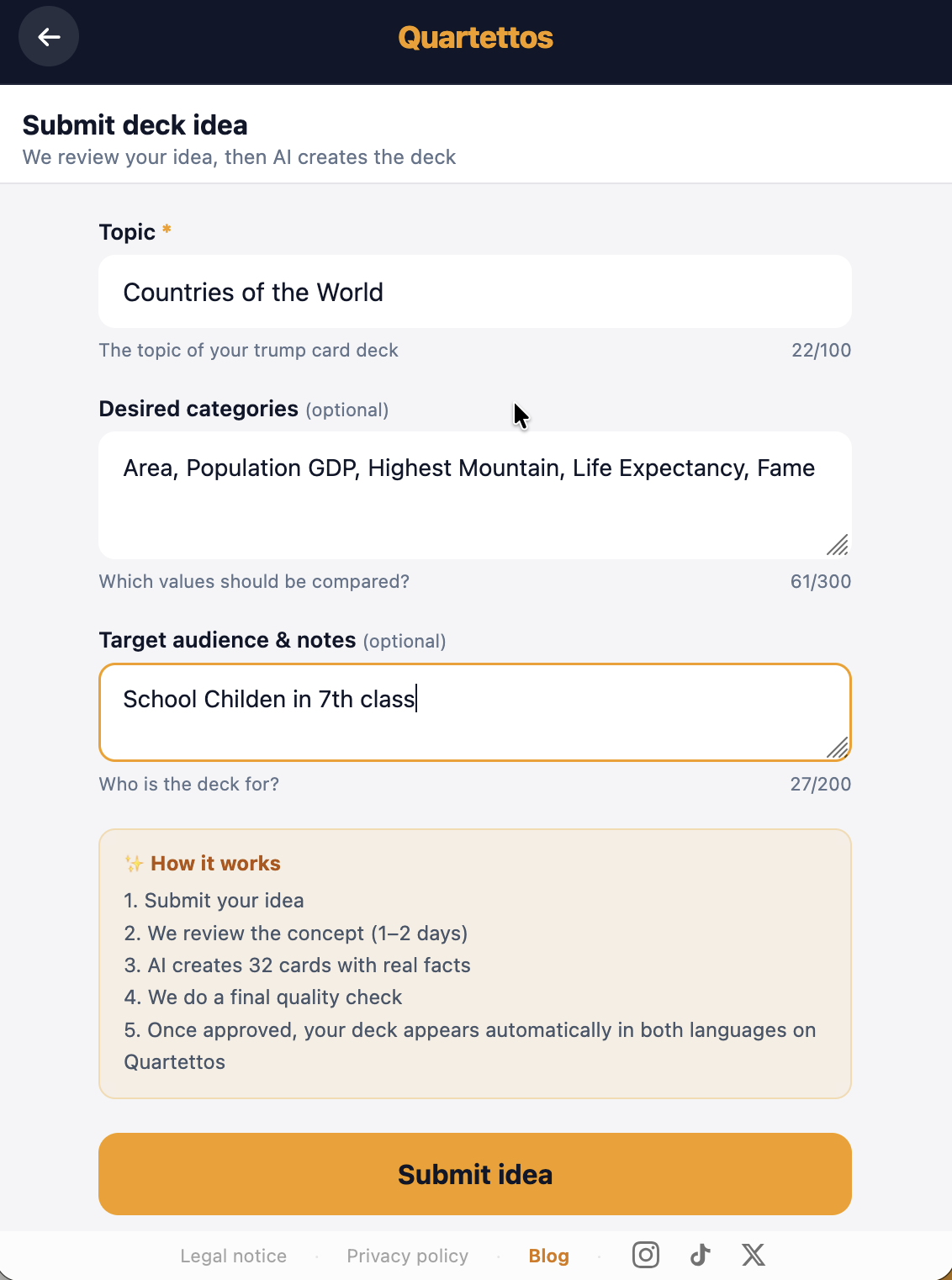
Theme is the only required field (max 100 characters). For our running example, type:
Countries of the World, focus on size and population
Proposed categories is optional (max 300 characters). If you have strong opinions about what should be compared, list them with units:
Area (km²), Population (millions), GDP per capita ($), Year of independence, Recognizability (/10)
Leave this blank and the AI will pick categories that fit the theme. We pick well, but if you have specific data sources in mind, naming them here helps. For our countries deck, you could mention "use 2024 UN population data" and we'll target that source.
Audience and notes is also optional (max 200 characters). This is where you tell us the tone:
For geography class, year 7, simple language
Or:
Bachelor party, cheeky tone welcome
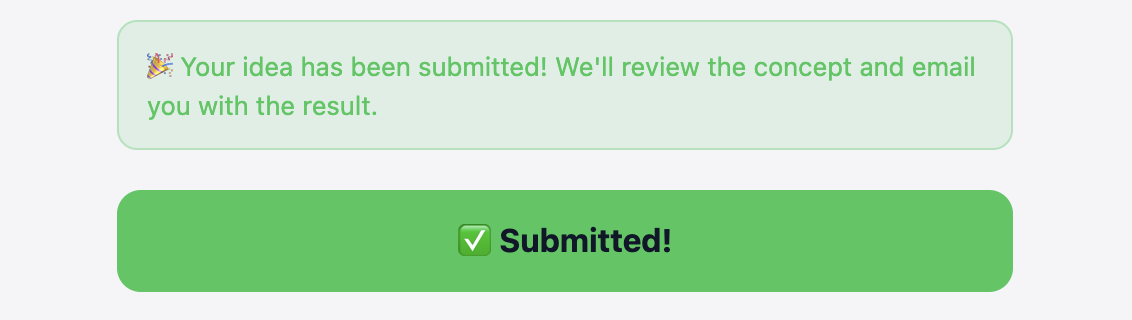
Hit "Submit idea". The button turns green, the form locks, and you'll see a short confirmation: we'll be in touch by email. That's the whole pitch — five minutes if you're indecisive.
A few things you can't do in the pitch step: you can't upload images yet (that comes later in the editor), you can't dictate the exact 32 cards, and you can't pitch anonymously. A logged-in account is required because that's where the preview email will go.
Step 2: Wait for the preview
Here's the honest bit. Quartettos is a side project, and a human reviews every pitch before the AI starts generating — that's us, looking at whether the topic actually yields 32 real examples, whether the values would be interesting, and whether anything sensitive needs a quick check-in. Approval usually comes back within hours, sometimes within fifteen minutes if we're at our desk, sometimes overnight if you submitted in the evening. As a rule of thumb, expect the preview email within a day. Generation runs once approval is granted.
We're not trying to gatekeep ideas. The review catches things like: themes that don't have 32 real examples ("Famous Austrian astronauts" doesn't), topics where the values would collapse into all-9s-and-10s, and the occasional sensitive case where we want to check in before generating (living people with claims about them, politically heated material). If the concept needs a tweak, you'll get an email explaining what would work better. You can re-submit a revised version straight away.
When generation is done, the email lands with a link to your preview. You can browse all 32 cards, read the descriptions, check the values, and decide whether you want to dive into the editor or ask for a regeneration. If the AI clearly missed the brief — wrong era, wrong region, wrong category interpretation — reply to the email and we'll regenerate. If it's mostly right and just needs polish, skip to Step 3.
While you wait, this is a good time to gather your own photos. If you have shots of local landmarks, hobby objects, or your own nature photography that fit the theme, dig them out. If you're a teacher planning to swap in textbook diagrams, scan them. The image upload doesn't open until your deck is approved, but having a folder ready saves an hour later.
A small reality check: the AI is great at well-documented topics — countries, animals, historical figures, films. For tight specialty topics — historical wrestling bouts, regional pubs, local landmarks — it will produce something workable, but you'll do more editing than on a textbook classic. That's exactly what the editor is for.
Step 3: Fine-tune values and texts
Once the deck is approved, it shows up under "My decks" in the menu. Click into it for the card overview, then click any card to open its editor.
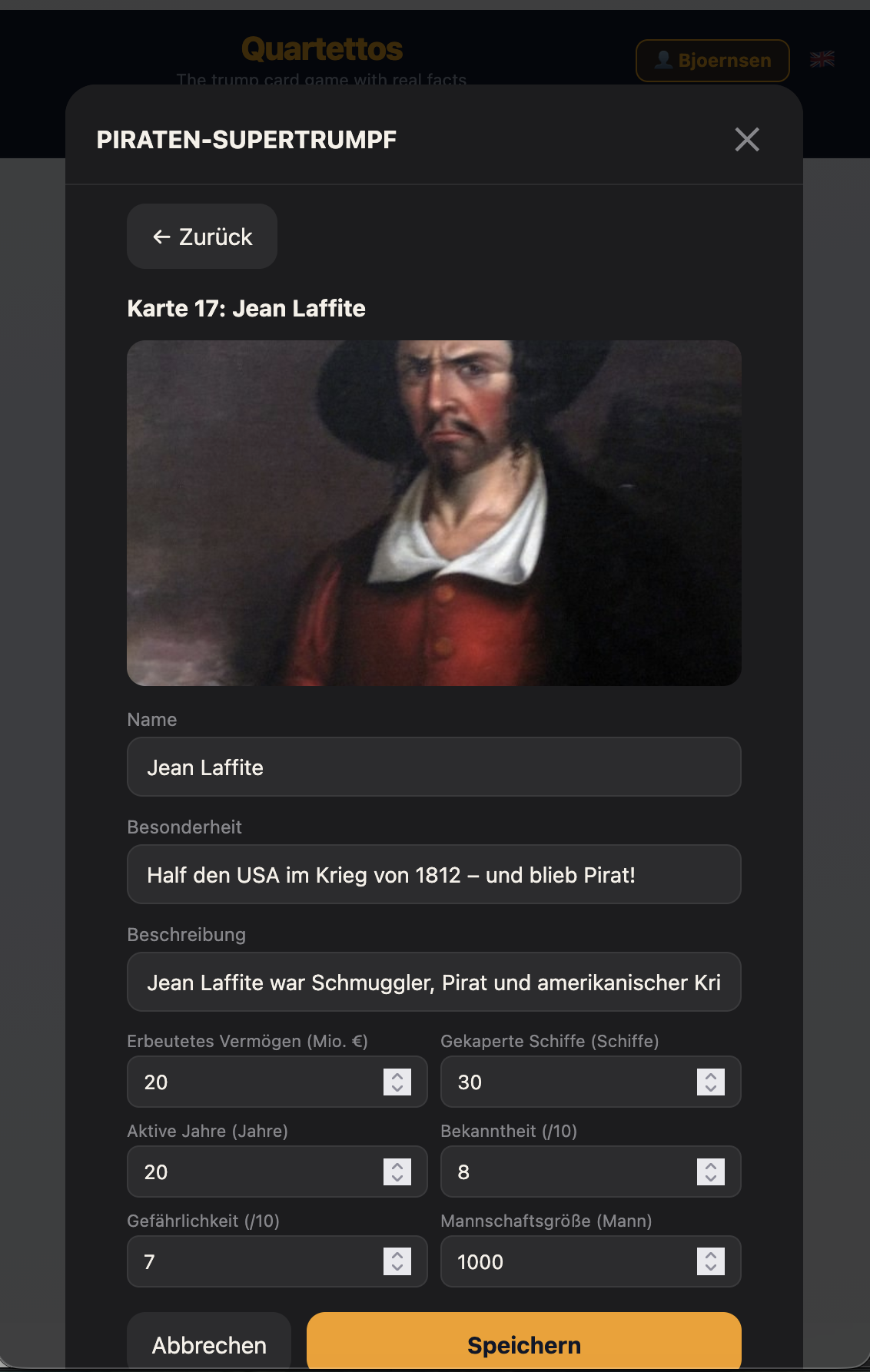
The editor is straightforward. You see the card title (like "Card 02: France") and its image at the top, then a stack of editable fields below.
- Name — the card's primary label, kept short.
- Trivia — the punchy fun-fact that makes this card distinctive (around 60 characters).
- Description — the longer text below the values.
- Values — one numeric field per category, with up/down spinners. Pre-filled by the AI.
The value fields are where most of the work happens for serious decks. The AI is good at general knowledge but you might have better data — a teacher might prefer this term's textbook figures, a hobbyist might know collector statistics by heart, a parent definitely knows their kid better than any AI. Tap a value, type the corrected number, hit save. One card at a time. The yellow "Save" button is at the bottom; the gray "Cancel" beside it backs out without changes.
A few things you can't change once a deck is generated: the category definitions are fixed. Name, unit, and direction (higher-wins or lower-wins) are locked in. So if a category turned out to be a bad fit, that's a regeneration request, not an editor task. You also can't change the number of cards (always 32) or categories (always 5 or 6), and you can't reorder cards.
After heavy editing, check your balance. The rough rule: each card should win in two or three categories and lose in two or three. If you've boosted one card so much it now wins everything, the game gets boring fast. Play a quick test round in hot-seat mode (more on that in Step 5) — you'll spot dominance problems within five rounds.
Save propagates immediately. The moment you save a card, anyone playing your deck sees the new version on their next match. There's no draft state, no publish button.
Step 4: Personalize the images
This is where decks become genuinely yours. In the card editor, click the current image. Your operating system's file picker opens. Pick a JPG, PNG, WebP, or HEIC (from iPhone) from your device. Upload happens automatically.
We optimize on the server side: every image is resized to a 1200-pixel-wide version, EXIF metadata is stripped, and the file is stored in our Cloudflare R2 bucket with a versioned filename. You don't need to compress in advance — upload the full-resolution shot from your camera. Versioned filenames mean no cache headaches: the new image appears for everyone immediately, and old versions stay archived in case you need to roll back.
Aim for roughly square or slightly portrait images. Wide panoramas crop awkwardly. Minimum useful resolution is around 800 pixels on the long edge; more is fine, we'll handle the rest.
A word on licensing — you're responsible for what you upload. Own photos are perfect. Public-domain images (Wikimedia Commons, with the right license tags) are fine. Stock-photo sites with a "free for commercial use" license, also fine. What's not fine: ripping copyrighted images off Google search results without permission. And remember: images go public with the deck. Anything you wouldn't want strangers to see, don't upload.
You can't currently remove an image without replacing it. Every card needs some picture. If you don't want to replace a particular card's image, leave the AI's suggestion in place and move on.
Step 5: Play and share
Your deck is live the moment it's approved, even before you've personalized a single card. Three ways to play:
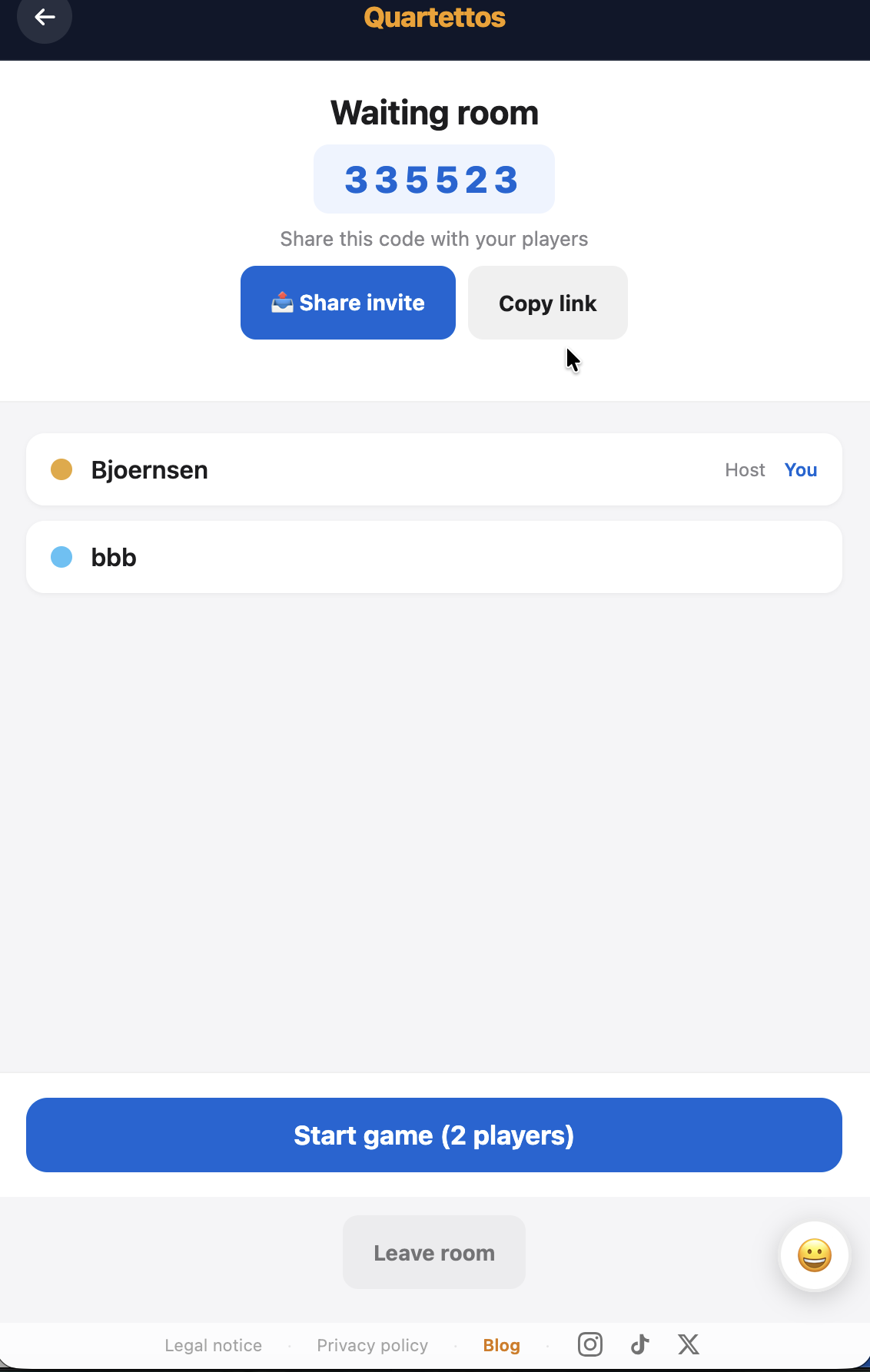
Online multiplayer (2–6 players). Main menu, "Play online", pick your deck, "Create room". You get a six-digit code and a share button. The share button uses your device's native share sheet — WhatsApp, iMessage, AirDrop, Mail, whatever you have. Tap it, pick a contact, the invite goes out. There's also a plain "Copy link" option for older browsers. Your friends don't need an account: they just click the link, type a name, and join. Only the deck's creator needs to be logged in — that's you.
Hot-seat (one device, multiple players). Same menu, "Hot-seat" mode. Everyone passes the phone around. When the active player has chosen their category and the round resolves, the screen prompts the next player to take over. Good for parties, road trips, and the kitchen table.
Solo against AI. Three difficulty levels: Beginner (random category choice), Intermediate (the AI compares your value against the deck's full distribution), and Strategist (the AI knows what cards are still in opponents' hands and calculates win probabilities). The Strategist is genuinely hard to beat on most decks — useful for testing balance.
About bilingual play: every deck is generated in both English and German automatically. Players landing on a German-locale device see the German texts; English-locale players see English. Same deck, same cards, same images — different language layer on top. International families and bilingual classes get this for free.
Print export to PDF isn't live yet — that's on the roadmap. For now, online and hot-seat play cover most situations, and the digital experience runs in any modern browser without an install.
Common mistakes and how to dodge them
- Theme too broad. "Animals" or "History" gives the AI nothing to grip. Narrow to "African mammals" or "Roman emperors". Specificity makes better cards.
- Values that don't spread. "Top 32 most famous humans" all score 9–10 on fame — the game becomes coin-flip. Pick themes with natural variation: countries range from Vatican (0.5 km²) to Russia (17 million km²), which is exactly the kind of spread that makes a good deck.
- Too many subjective values. "Coolness" and "Awesomeness" are arguments waiting to happen. Stick to measurable values; reserve
/10ratings for two of six slots at most. - One card dominates everything. If your dragon wins every category, the game ends in three rounds. The AI guards against this, but heavy editing can re-introduce the problem. Make sure every card is weak somewhere.
- Card names nobody recognizes. "Procyon lotor" is fine as a subtitle, but the main name should be "Raccoon". Rule of thumb: a typical player should recognize 80% of card names on sight.
- Sources you'll need to defend. If your deck will be played seriously (classroom, club tournament), note your sources in the card descriptions. Disputed values during play are no fun.
What people have built so far
A quick sample of what's already live in the Quartettos library:
- Countries of the World — the running example. Classic geography deck with population, area, GDP. Universal appeal, great for first-time players.
- Classic Computer Games (English) — pixel-era nostalgia. The kind of deck no publisher would ever print, which is exactly the niche Quartettos is for.
- Insects of the World — biology classroom material, sized for year 5–7. Size, weight, speed, lifespan, distribution.
- Famous Pirates — history hobby with values like loot captured, ships taken, crew size, infamy. Anne Bonny, Blackbeard, the whole crew.
- Deadly Mushrooms — biology niche, focused on toxicity and confusion-risk with edible look-alikes. Both educational and faintly terrifying.
The full library spans ancient monuments, philosophers, conspiracy theories, smurfs, supercars, US presidents, deep-sea creatures, pizza varieties, and roughly two dozen other categories. The takeaway: there's no theme too small, too weird, or too specialist.
Pitch ideas, by audience
Stuck for inspiration? Three clusters to spark something:
Education. Capitals of Europe. Native birds of Britain. Roman emperors. The French Revolution: key figures. Mathematical constants. Mammals of South America. Renaissance painters. Geological time periods.
Place and local culture. Famous people from a city (Hamburg, Manchester, Lyon, your call). Berlin Eckkneipen. Coffee houses of Vienna. Landmarks of San Francisco. London pubs by neighborhood. Bridges of Paris. Decks that resonate with locals and intrigue everyone else.
Niche and hobby. Classic Amiga games. 80s sitcoms. WCW wrestlers, 1990–2000. Synthwave albums. Vintage Polaroid cameras. Subgenres of black metal. UK steam locomotives. Classic rally cars. The decks no publisher will ever make are exactly the ones that travel best at your kitchen table.
Ready to pitch?
Head to quartettos.com, sign up with email and password, and find "Create your own deck" in the menu. The pitch form takes five minutes. The preview usually lands within a few hours, sometimes overnight if you submit late. The result is a bilingual card deck nobody else has — yours to fine-tune, illustrate with your own photos, and play with your people.
We'll see your idea in the inbox soon.